
Save Your Time
On Creating Cards.
Memorize More.
No need to waste your time creating vocabulary
flashcards. Spend more time memorizing and
boost your vocabulary.
 ChatGPT
 Claude
& PDFs
YouTube
Free to try. Learn anytime, anywhere.
new words
everyday╱
—
╲

My Decks
content
to knowledge—
╱
╱
VOCAPI IN CHATGPT
Save vocabulary from ChatGPT in one tap
Learning with ChatGPT? Don't lose the new words in a long chat. Vocapi turns them into flashcards you actually review, with meanings, example sentences and audio.
Add Vocapi to ChatGPT
Connect the Vocapi app in ChatGPT and sign in with your Vocapi account, once.
Ask it to save words
Type “@vocapi Add this”, or say “save the vocabulary from this article to Vocapi”. ChatGPT picks the words and writes a meaning and example for each.
Review, then save
A checklist shows every word first. Untick what you know, choose a playlist and save. Nothing is saved until you do.
Study on your phone
Open the Vocapi app with the same account. Your words are there as flashcards with audio, ready for a quick daily review.
Try saying
- “@vocapi Add this”
- “Save the words I didn’t know from this article to Vocapi.”
- “Add “serendipity” and “eloquent” to my Vocapi Business English playlist.”
- “Make a Vocapi list of 20 words for my IELTS speaking test.”
SET IT UP
Add Vocapi to ChatGPT in four steps

Add Vocapi to ChatGPT, then save new words while you chat.
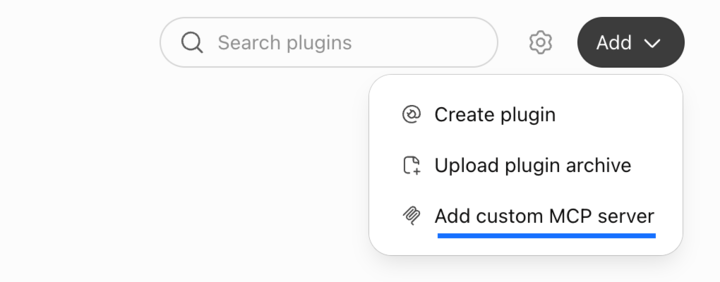
Open Plugins in ChatGPT
Go to chatgpt.com/plugins (opens in a new tab), click Add, then Add custom MCP server.
Fill in the form
A form opens. Set Name to Vocapi, paste this URL into Server URL, and leave Authentication as OAuth.
https://www.vocapi.xyz/mcpIt should look like this:
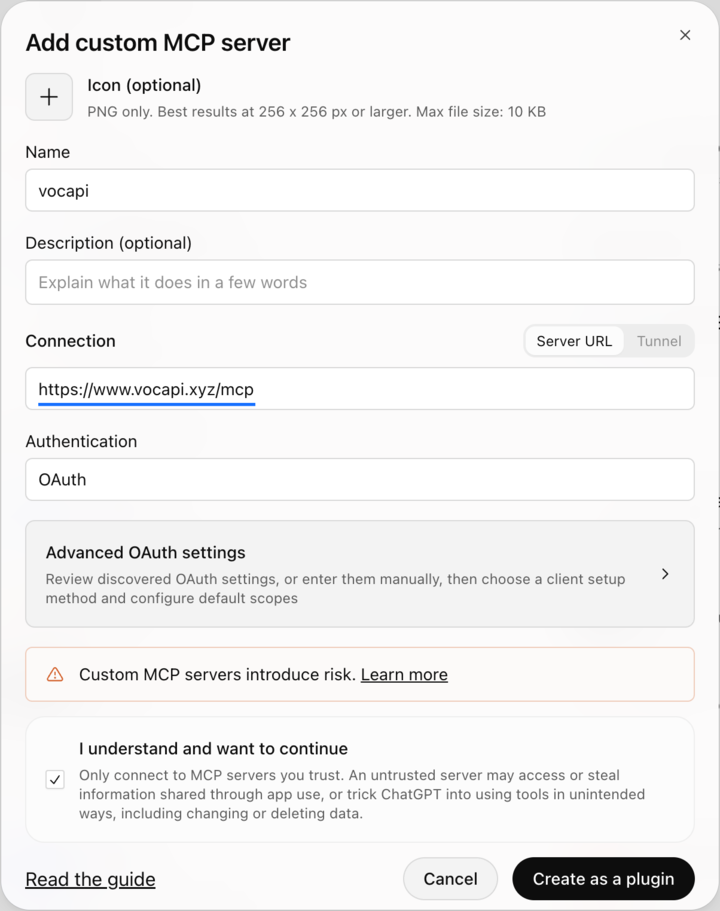
Confirm and sign in
Tick I understand and want to continue, click Create as a plugin, then sign in with your Vocapi email.
Ask it to save words
Type @vocapi in a chat, then ask:
- @vocapi save the hard words from your last answer.
- @vocapi what does “ubiquitous” mean? Save it to my Exam Prep deck.
WHY VOCAPI
Save hours
of study time
Learn from
real content
Remember
what matters
Study
anywhere
HOW IT WORKS
From content to flashcards in three steps
Bring your content
Paste text or a link, or choose a PDF, screenshot, audio file or YouTube video you are already studying.
Let AI pick the words
Vocapi extracts the vocabulary worth learning and writes a clear meaning and example for each word.
Review a little every day
Study your decks in short daily sessions so new words move into long-term memory.
LEARN FROM ANYTHING
Make vocabulary flashcards from what you read, watch and hear
ChatGPT conversations
Ask ChatGPT to save the words from your chat. Review the list, pick a playlist and they're in Vocapi.
Articles & web pages
Paste a link to a news story or blog post and turn the unfamiliar words into a deck.
PDF to flashcards
Upload textbooks, papers or reports and pull out the key terms in seconds.
Screenshots & photos
Snap a book page, a sign or a menu and learn the words in the picture.
YouTube to flashcards
Learn the vocabulary from the videos, talks and lessons you already watch.
Audio & podcasts
Record speech or add an audio file and study the words you heard.
FAQ
Frequently asked questions
What is Vocapi?
Vocapi is an AI vocabulary builder app. Save words straight from ChatGPT, or turn the articles, PDFs, screenshots, audio and YouTube videos you already use into flashcards, so you learn new words in context instead of from generic word lists.
Does Vocapi work with ChatGPT?
Yes. Add the Vocapi app in ChatGPT and ask it to save words from your conversation. You review the list in a checklist, choose a playlist and save, and the words appear as flashcards in the Vocapi app on your phone.
How is Vocapi different from Anki or Quizlet?
You don't build cards by hand. Vocapi's AI picks the words from your content or your ChatGPT chats and writes the meaning, example sentence and audio for each card, so a new deck takes seconds instead of an evening.
What can I turn into flashcards?
Articles and web links, pasted text, PDFs, screenshots and photos, audio recordings and YouTube videos.
How does Vocapi choose which words to learn?
Vocapi's AI reads your content, picks out the vocabulary worth studying and writes a meaning and example sentence for each card. You can edit or remove any card.
Is Vocapi free?
Yes, Vocapi is free to try.
Where can I get the Vocapi app?
The Vocapi mobile app is coming soon to the App Store and Google Play. Until then, you can try the interactive flashcard preview on this page.