
Create vocabulary flashcards from ChatGPT
Learning English with ChatGPT? The new words get lost in long chats. Vocapi plugs into ChatGPT, so you can say “@vocapi save these words” and get a vocabulary list you actually review, as flashcards with meanings, example sentences, audio and pictures.
The short answer
- Add Vocapi to ChatGPT once, as a custom MCP plugin, and sign in with your Vocapi account.
- In any chat, say “@vocapi save the hard words from your last answer”. ChatGPT picks the words and writes a meaning and example for each.
- Untick what you already know, pick a playlist and save. The words become flashcards in the Vocapi app, with audio and a picture.
How it works
Chat in English as usual
Ask ChatGPT to explain an article, correct your writing or practise a conversation. New words come up naturally.
Ask it to save the words
Type “@vocapi Add this”, or name the words you want. ChatGPT writes a short meaning and an example sentence for each one.
Review, then save
A checklist shows every word first. Untick what you know, choose a playlist and save. Nothing is saved until you do.
Study them every day
Open Vocapi on iPhone, Android or the web. Each word is a flashcard with audio, a picture and spaced-repetition reviews.
Try saying
- “@vocapi Add this”
- “Save the words I didn’t know from this article to Vocapi.”
- “Make a Vocapi list of 20 phrasal verbs for meetings at work.”
- “Add “serendipity” and “eloquent” to my Vocapi Business English playlist.”
- “Make a Vocapi list of 20 words for my IELTS speaking test.”
Add Vocapi to ChatGPT in four steps

Add Vocapi to ChatGPT, then save new words while you chat.
Open Plugins in ChatGPT
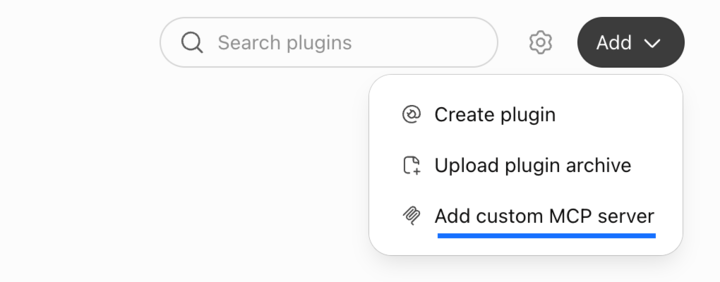
Go to chatgpt.com/plugins (opens in a new tab), click Add, then Add custom MCP server.
Fill in the form
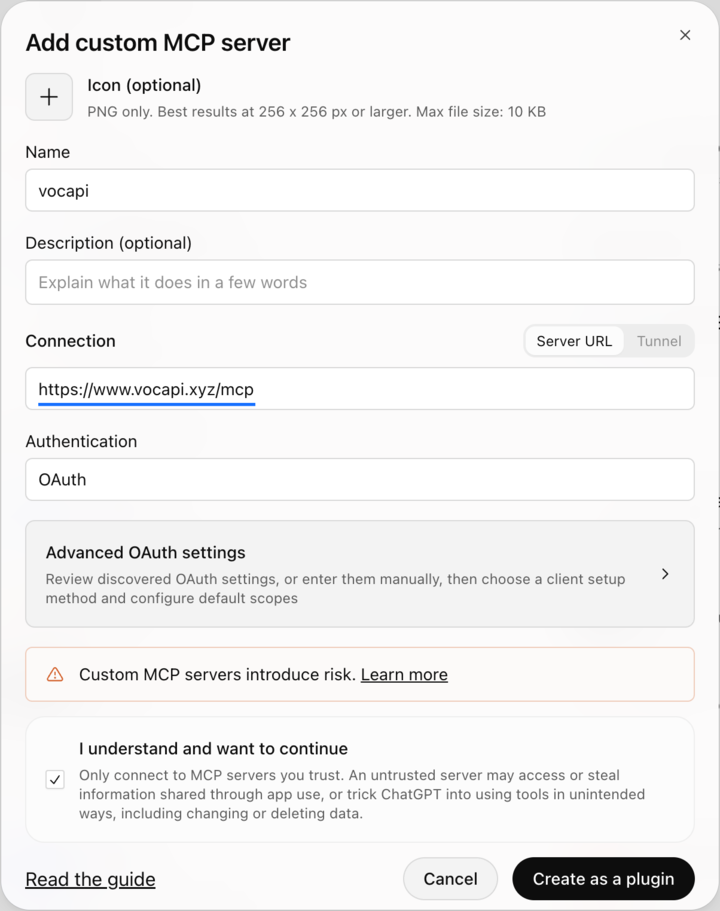
A form opens. Set Name to Vocapi, paste this URL into Server URL, and leave Authentication as OAuth.
https://www.vocapi.xyz/mcpIt should look like this:
Confirm and sign in
Tick I understand and want to continue, click Create as a plugin, then sign in with your Vocapi email.
Ask it to save words
Type @vocapi in a chat, then ask:
- @vocapi save the hard words from your last answer.
- @vocapi what does “ubiquitous” mean? Save it to my Exam Prep deck.
Questions
Can ChatGPT make vocabulary flashcards?
ChatGPT can list words and explain them, but the list stays buried in the chat. With Vocapi added to ChatGPT, it saves those words as flashcards in your Vocapi account, so you review them later instead of losing them.
Is it free?
Yes. Adding Vocapi to ChatGPT and saving words is free with a Vocapi account. You need a ChatGPT plan that supports custom MCP plugins.
Which ChatGPT plans support it?
Any ChatGPT plan that lets you add a custom MCP server under Plugins. Follow the four setup steps on this page; if you don’t see the Add custom MCP server option, your plan or workspace may not allow it yet.
Does Vocapi save every word automatically?
No. ChatGPT suggests the words, and you see a checklist before anything is saved. Untick the words you already know, choose a playlist, then save.
Can I make a vocabulary list on a topic, not from a chat?
Yes. Ask “@vocapi make a list of 20 words for job interviews” (or any topic or exam, like IELTS or TOEFL). ChatGPT picks the words and Vocapi saves them as a playlist.
Where do I study the words?
In the Vocapi app on iPhone and Android, or on the web. Each word has a meaning, an example sentence, audio and a picture, and reviews are spaced so you see words right before you would forget them.
Keep the words ChatGPT teaches you
Sign up free, add Vocapi to ChatGPT, and your next chat becomes a vocabulary list.
Sign up freeAlso see: Vocapi vs Anki · Vocapi vs Quizlet